


Contact
United States (USD $)
  • Australia (USD $)
  • Austria (EUR €)
  • Belgium (EUR €)
  • Bulgaria (EUR €)
  • Canada (USD $)
  • Croatia (EUR €)
  • Czechia (CZK Kč)
  • Denmark (DKK kr.)
  • Estonia (EUR €)
  • Finland (EUR €)
  • France (EUR €)
  • Germany (EUR €)
  • Greece (EUR €)
  • Hungary (HUF Ft)
  • Ireland (EUR €)
  • Italy (EUR €)
  • Latvia (EUR €)
  • Lithuania (EUR €)
  • Luxembourg (EUR €)
  • Malta (EUR €)
  • Netherlands (EUR €)
  • New Zealand (USD $)
  • Norway (USD $)
  • Poland (PLN zł)
  • Portugal (EUR €)
  • Romania (RON Lei)
  • Slovakia (EUR €)
  • Slovenia (EUR €)
  • Spain (EUR €)
  • Sweden (SEK kr)
  • Switzerland (USD $)
  • United Kingdom (USD $)
  • United States (USD $)
WeTheSound
Menu
  • Home
  • Sounds
    Sounds
    • Construction Kits
    • One Shots
    • Loop Kits
    • Drum Kits
  • Plugins
    Plugins
    • DIG – FL Studio (Waitlist)
  • Discover Kits
  • Blogs
  • Services
  • Login / Register
United States (USD $)
  • Australia (USD $)
  • Austria (EUR €)
  • Belgium (EUR €)
  • Bulgaria (EUR €)
  • Canada (USD $)
  • Croatia (EUR €)
  • Czechia (CZK Kč)
  • Denmark (DKK kr.)
  • Estonia (EUR €)
  • Finland (EUR €)
  • France (EUR €)
  • Germany (EUR €)
  • Greece (EUR €)
  • Hungary (HUF Ft)
  • Ireland (EUR €)
  • Italy (EUR €)
  • Latvia (EUR €)
  • Lithuania (EUR €)
  • Luxembourg (EUR €)
  • Malta (EUR €)
  • Netherlands (EUR €)
  • New Zealand (USD $)
  • Norway (USD $)
  • Poland (PLN zł)
  • Portugal (EUR €)
  • Romania (RON Lei)
  • Slovakia (EUR €)
  • Slovenia (EUR €)
  • Spain (EUR €)
  • Sweden (SEK kr)
  • Switzerland (USD $)
  • United Kingdom (USD $)
  • United States (USD $)

Trending Search

  • One shots
  • Drum kits
  • Loops
Popular Products
Emotional Damage – Melodic Loop Kits – royalty-free sample pack by WeTheSound
Emotional Damage - Loop Kit loading
Regular price $4.00 USD
Peach Vol. 1 – Melodic Pop Loop Kits – royalty-free sample pack by WeTheSound
Peach Vol. 1 - Loop Kit loading
Regular price $4.00 USD
IAN SWAG – Drums And Loops Samples – royalty-free sample pack by WeTheSound
IAN Swag - Multi-Kit loading
Regular price $4.00 USD
TRAP GALORE – Dark Trap Drums & Loops – royalty-free sample pack by WeTheSound
Trap Galore - Multi-Kit loading
Regular price $5.00 USD
The Don – Construction Kit – royalty-free sample pack by WeTheSound
The Don - Construction Kit loading
Regular price $3.00 USD
1 1 item
Shopping Cart (1)
After Lyfe Vol. 1 – Rage Construction Kits – royalty-free sample pack by WeTheSound

After Lyfe Vol. 1 - Construction Kit

    $4.00 USD

    You may also like...

    Add Order Note
    Subtotal
    $4.00 USD
    View Cart
    Home / Producer Guides
    1176

    Using the 1176 on Vocals: A Guide to Perfect Compression

    WeTheSound Studio 2 min read January 4, 2025
    Using the 1176 on Vocals: A Guide to Perfect Compression
    On this page

    Using the 1176 on Vocals: A Guide to Perfect Compression

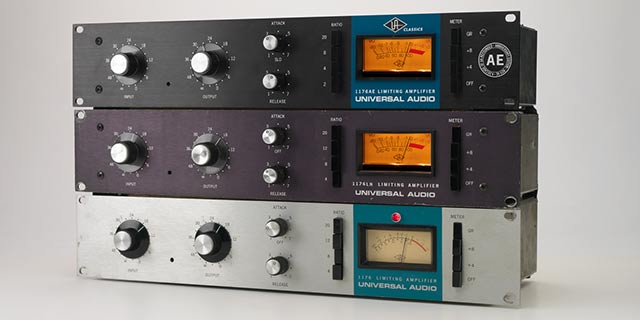
    The 1176 compressor is a legendary tool in music production, renowned for its ability to shape dynamics with precision and character. Whether you’re mixing pop, hip-hop, R&B, or any other genre, the 1176 can transform your vocal tracks from raw recordings to polished performances. In this guide, we’ll show you how to effectively use the 1176 compressor on vocals to achieve professional-quality results.

    Why Choose the 1176 for Vocals?

    The 1176 is a favorite among producers and engineers for several reasons:

    • Fast Attack and Release Times: Capture every nuance of a performance without losing energy.
    • Distinctive Tone: Adds warmth and subtle saturation that enhances the vocal's presence.
    • Versatility: Works beautifully on everything from subtle compression to aggressive limiting.

    Explore the 1176 Classic Limiter Plug-In Collection from Universal Audio here.

    Getting Started with the 1176

    Step 1: Choose the Right Ratio

    The 1176 offers four main ratio settings:

    • 4:1: Ideal for gentle compression and natural dynamics.
    • 8:1: A great choice for moderate control.
    • 12:1: Perfect for taming more dynamic performances.
    • 20:1: Best for limiting and aggressive compression.

    For most vocals, start with a 4:1 or 8:1 ratio and adjust based on the track’s dynamics.

    Step 2: Set the Attack and Release

    • Attack: Start with a medium-fast setting to capture transients without making the vocal sound unnatural.
    • Release: Set to a fast release to maintain energy and ensure the vocal stays present in the mix.

    Pro Tip: Adjust the attack and release times to match the tempo and feel of the song.

    Step 3: Dial in the Input and Output

    • Increase the Input until you achieve the desired amount of gain reduction (typically 3-7 dB for vocals).
    • Adjust the Output to match the overall volume of the track.

    Advanced Tips for Using the 1176 on Vocals

    1. Use the All-Buttons Mode

    Engage the famous "All-Buttons Mode" (also known as "British Mode") by pressing all ratio buttons simultaneously. This setting creates a unique compression effect with added harmonic distortion, perfect for adding grit and character to aggressive vocals.

    2. Parallel Compression

    Blend a heavily compressed version of the vocal with the dry signal to retain natural dynamics while adding punch and presence. This technique works particularly well for lead vocals in dense mixes.

    3. Stack Compressors

    Combine the 1176 with a slower compressor, such as an LA-2A, for a smooth and controlled vocal. Use the 1176 first to handle peaks and the LA-2A to even out the overall performance.

    Common Mistakes to Avoid

    • Over-Compression: Be careful not to squash the dynamics too much, which can make the vocal sound lifeless.
    • Ignoring Context: Always listen to the vocal in the context of the full mix when setting your compression.
    • Mismatched Attack/Release: Ensure your settings complement the song’s tempo and style.

    Why the 1176 Stands Out

    The 1176 compressor is more than just a dynamics tool; it’s a creative weapon that can shape your vocal sound in unique ways. Its fast attack and release, combined with its tonal character, make it a go-to for producers seeking professional, polished vocals.

    Final Thoughts

    Mastering the 1176 on vocals takes practice, but the results are worth it. Whether you’re adding subtle control or bold character, this iconic compressor can bring your vocal tracks to life.

    Ready to elevate your mixes? Start experimenting with the 1176 today and discover why it’s a staple in studios worldwide.

    Learn More About UAD and the 1176

    For more tips and insights on using UAD compressors, check out these blogs:
    • Guide to UAD Compressors
    • 1176 Compressor Guide for Drums
    • The Vocal Chain Essential: Mastering the UAD 1176 Compressor Collection
    • Kick Drum Power: The Ultimate UAD 1176 Guide
    • Crank Up the Crisp: UAD 76 Secrets for Trap Drums That Slap
    Share X Facebook WhatsApp

    Sounds for this

    Emotional Damage - Loop Kit
    Emotional Damage$4.00
    Peach Vol. 1 - Loop Kit
    Peach Vol. 1$4.00

    Hear it in your own beats

    Royalty-free loop kits, drum kits and construction kits — instant download.

    Browse sounds

    Keep reading

    10 FL Studio Workflow Tips to Make Beats Faster in 2026 2 min 10 FL Studio Workflow Tips to Make Beats Faster in 2026 10 FL Studio workflow tips to make beats faster: templates, shortcuts, reusing your own patterns, organizing MIDI and more. Stuck on a Beat? How to Stack Old FL Studio Patterns for New Ideas 2 min Stuck on a Beat? How to Stack Old FL Studio Patterns for New Ideas Stuck on a beat? Stack hi-hats, 808s, chords and melodies from your old FL Studio projects to get new ideas in seconds.... How to Export MIDI From FL Studio: Every Pattern, Every Project 2 min How to Export MIDI From FL Studio: Every Pattern, Every Project How to export MIDI from FL Studio: one pattern from the Piano Roll, a full song, or every pattern from every project...

    Shop

    • Loop Kits
    • Drum Kits
    • Construction Kits
    • One-Shot Kits
    • Plugins
    • DIG – Waitlist
    • Mixing & Mastering

    Learn

    • Producer Guides
    • How to Organize MIDI in FL Studio
    • Reuse Old FL Studio Projects
    • Build a MIDI & Loop Library
    • Royalty-Free Loop Kits Guide
    • FL Studio Guide

    Help

    • Privacy Policy
    • Refund Policy
    • Terms of Service
    Privacy Policy - Refund Policy - Terms of Service © 2026 WeTheSound. All rights reserved.
    • American Express
    • Apple Pay
    • Bancontact
    • BLIK
    • Cartes Bancaires
    • EPS
    • Google Pay
    • Klarna
    • Mastercard
    • MobilePay
    • PayPal
    • Satispay
    • Shop Pay
    • Visa
    Home Plugins Account Shop 1 1 item Cart
    Skip to content
    • Choosing a selection results in a full page refresh.
    • Opens in a new window.