


Contact
France (EUR €)
  • Australia (USD $)
  • Austria (EUR €)
  • Belgium (EUR €)
  • Bulgaria (EUR €)
  • Canada (USD $)
  • Croatia (EUR €)
  • Czechia (CZK Kč)
  • Denmark (DKK kr.)
  • Estonia (EUR €)
  • Finland (EUR €)
  • France (EUR €)
  • Germany (EUR €)
  • Greece (EUR €)
  • Hungary (HUF Ft)
  • Ireland (EUR €)
  • Italy (EUR €)
  • Latvia (EUR €)
  • Lithuania (EUR €)
  • Luxembourg (EUR €)
  • Malta (EUR €)
  • Netherlands (EUR €)
  • New Zealand (USD $)
  • Norway (USD $)
  • Poland (PLN zł)
  • Portugal (EUR €)
  • Romania (RON Lei)
  • Slovakia (EUR €)
  • Slovenia (EUR €)
  • Spain (EUR €)
  • Sweden (SEK kr)
  • Switzerland (USD $)
  • United Kingdom (USD $)
  • United States (USD $)
WeTheSound
Menu
  • Home
  • Sounds
    Sounds
    • Construction Kits
    • One Shots
    • Loop Kits
    • Drum Kits
  • Plugins
    Plugins
    • DIG – FL Studio (Waitlist)
  • Discover Kits
  • Blogs
  • Services
  • Login / Register
France (EUR €)
  • Australia (USD $)
  • Austria (EUR €)
  • Belgium (EUR €)
  • Bulgaria (EUR €)
  • Canada (USD $)
  • Croatia (EUR €)
  • Czechia (CZK Kč)
  • Denmark (DKK kr.)
  • Estonia (EUR €)
  • Finland (EUR €)
  • France (EUR €)
  • Germany (EUR €)
  • Greece (EUR €)
  • Hungary (HUF Ft)
  • Ireland (EUR €)
  • Italy (EUR €)
  • Latvia (EUR €)
  • Lithuania (EUR €)
  • Luxembourg (EUR €)
  • Malta (EUR €)
  • Netherlands (EUR €)
  • New Zealand (USD $)
  • Norway (USD $)
  • Poland (PLN zł)
  • Portugal (EUR €)
  • Romania (RON Lei)
  • Slovakia (EUR €)
  • Slovenia (EUR €)
  • Spain (EUR €)
  • Sweden (SEK kr)
  • Switzerland (USD $)
  • United Kingdom (USD $)
  • United States (USD $)
France (EUR €)
  • Australia (USD $)
  • Austria (EUR €)
  • Belgium (EUR €)
  • Bulgaria (EUR €)
  • Canada (USD $)
  • Croatia (EUR €)
  • Czechia (CZK Kč)
  • Denmark (DKK kr.)
  • Estonia (EUR €)
  • Finland (EUR €)
  • France (EUR €)
  • Germany (EUR €)
  • Greece (EUR €)
  • Hungary (HUF Ft)
  • Ireland (EUR €)
  • Italy (EUR €)
  • Latvia (EUR €)
  • Lithuania (EUR €)
  • Luxembourg (EUR €)
  • Malta (EUR €)
  • Netherlands (EUR €)
  • New Zealand (USD $)
  • Norway (USD $)
  • Poland (PLN zł)
  • Portugal (EUR €)
  • Romania (RON Lei)
  • Slovakia (EUR €)
  • Slovenia (EUR €)
  • Spain (EUR €)
  • Sweden (SEK kr)
  • Switzerland (USD $)
  • United Kingdom (USD $)
  • United States (USD $)

Trending Search

  • One shots
  • Drum kits
  • Loops
Popular Products
Emotional Damage – Melodic Loop Kits – royalty-free sample pack by WeTheSound
Emotional Damage - Loop Kit loading
Regular price €2,99 EUR
Peach Vol. 1 – Melodic Pop Loop Kits – royalty-free sample pack by WeTheSound
Peach Vol. 1 - Loop Kit loading
Regular price €2,99 EUR
IAN SWAG – Drums And Loops Samples – royalty-free sample pack by WeTheSound
IAN Swag - Multi-Kit loading
Regular price €2,95 EUR
TRAP GALORE – Dark Trap Drums & Loops – royalty-free sample pack by WeTheSound
Trap Galore - Multi-Kit loading
Regular price €3,95 EUR
The Don – Construction Kit – royalty-free sample pack by WeTheSound
The Don - Construction Kit loading
Regular price €1,99 EUR
0 0 items
Shopping Cart (0)
Your cart is currently empty!.

You may check out all the available products and buy some in the shop.

Home / Producer Guides
beat making

How to Organize MIDI in FL Studio: Stop Losing Your Best Patterns

WeTheSound Studio 3 min read November 12, 2026
How to Organize MIDI in FL Studio: Stop Losing Your Best Patterns
On this page

Be honest. How many times have you opened an old project because you knew there was a crazy hi-hat roll in there… and spent twenty minutes clicking through patterns trying to find it? Every producer who's been on FL Studio for more than a year has the same problem: hundreds of projects, thousands of patterns, and zero way to find the good ones.

Your best ideas aren't lost. They're just buried. In this guide we'll break down a simple way to organize MIDI in FL Studio so your hi-hats, 808s, chords and melodies are always one click away — and show you how our upcoming tool DIG does the whole thing automatically.

Why Your MIDI Gets Lost in the First Place

FL Studio saves everything inside the .flp project file. That's great for recalling a session, but terrible for reusing ideas. A melody you wrote lives inside "Pattern 14" of a project called "beat new final 3". Unless you remember which project, it's gone.

On top of that, most of us never name patterns, never color them, and never export anything. Multiply that by a few hundred projects and you've got a goldmine you can't dig into.

Step-by-Step: A Manual MIDI Organization System

1. Name and color your patterns as you go:

Before you close a session, rename the patterns that matter ("HH Bounce 140", "808 Glide C#m") and give each type a color — for example teal for hi-hats, purple for 808s, yellow for melodies. It takes thirty seconds and saves you hours later.

2. Export your best patterns as MIDI files:

Open the pattern in the Piano Roll, then go to the piano roll menu and choose File > Export as MIDI file. Save it with the key and BPM in the name, like Keys Melody - C#m - 140.mid.

3. Build a folder structure that makes sense:

Create one main "MIDI Library" folder with sub-folders by type: Hi-Hats, Kicks, Snares, Percs, 808 & Bass, Chords, Melodies. Keep it simple — if you can't find a file in five seconds, the system is too complicated.

4. Add the folder to the FL Studio Browser:

In FL Studio's File settings you can add extra search folders so your library shows up directly in the Browser. Now your patterns are always on the left side of the screen, ready to drag into the Channel Rack.

5. Keep it going:

The hardest part isn't setting the system up, it's sticking to it. Make "export the good stuff" part of finishing every session.

The Problem With Doing It Manually

That system works — but let's be real, it only works going forward. It does nothing for the hundreds of projects already sitting on your drive. Going back and exporting every good pattern by hand would take weeks, and nobody has time for that when they could be making beats.

That's exactly why we built DIG.

How DIG Organizes Your MIDI Automatically

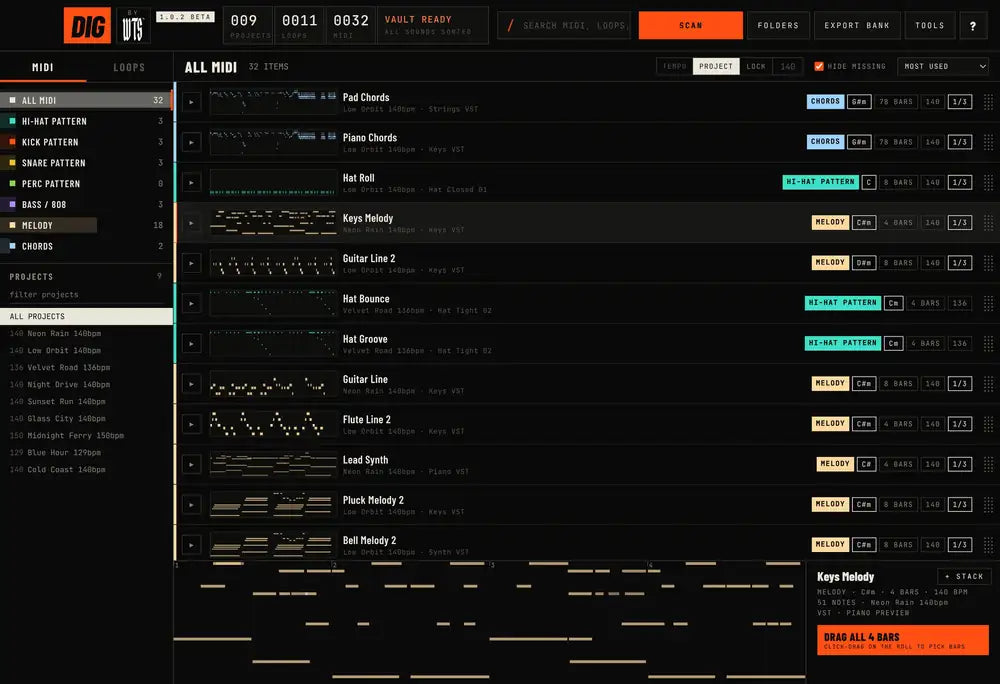
DIG is a desktop app for FL Studio producers (Mac & Windows). Point it at your projects folder, hit Scan, and it goes through every .flp you've made:

  • Extracts every pattern from every project — no opening sessions one by one.
  • Sorts MIDI by type: hi-hat patterns, kicks, snares, percs, bass & 808, melodies and chords.
  • Shows key, bars and BPM for each pattern so you can find something that fits your beat instantly.
  • Lets you preview any pattern and see it on the piano roll.
  • Drag and drop straight into FL Studio.
  • Filter by project and tempo, and search everything you've ever made.

Basically, it turns years of forgotten sessions into one clean, searchable MIDI library — the system above, done for you in minutes.

Pair Your Library With Fresh Sounds

Once your patterns are organized, swapping sounds becomes the fun part. Drop a melody you wrote two years ago onto a new instrument, or layer it with loops from a kit like Emotional Damage or our royalty-free loop kits. If you want to go deeper on chords, check out our FL Studio Chord Generator guide.


Get DIG Before Everyone Else

DIG is the FL Studio tool we built at WeTheSound to fix exactly this. It scans every project you've ever made, pulls out each hi-hat, 808, chord and melody, sorts them, and lets you drag any pattern straight into a new beat — without opening a single old project.

DIG is coming soon. Join the DIG waitlist here to be first in line when it drops, and check out the rest of our producer tools in the Plugins section.

Share X Facebook WhatsApp

Sounds for this

Emotional Damage - Loop Kit
Emotional Damage€2,99
Peach Vol. 1 - Loop Kit
Peach Vol. 1€2,99

Hear it in your own beats

Royalty-free loop kits, drum kits and construction kits — instant download.

Browse sounds

Keep reading

Build Your Own MIDI & Loop Library: The Workflow for Faster Beats in 2026 beat making faster · 2 min Build Your Own MIDI & Loop Library: The Workflow for Faster Beats in 2026 The fastest producers aren’t faster at clicking — they have a library. Here is how to build your own MIDI and loop... Your Old FL Studio Projects Are a Goldmine: How to Reuse Hi-Hats, 808s & Melodies 808 patterns · 2 min Your Old FL Studio Projects Are a Goldmine: How to Reuse Hi-Hats, 808s & Melodies Every unfinished beat on your hard drive has at least one idea worth saving. Here is how to pull hi-hats, 808s and... Get Beat Feedback & Production Tips on My Twitch Live 808 Mixing Tips · 1 min Get Beat Feedback & Production Tips on My Twitch Live Looking to improve your beat-making and mixing skills? Join my live Twitch streams where I cook up beats, give producers real-time feedback,...

Shop

  • Loop Kits
  • Drum Kits
  • Construction Kits
  • One-Shot Kits
  • Plugins
  • DIG – Waitlist
  • Mixing & Mastering

Learn

  • Producer Guides
  • How to Organize MIDI in FL Studio
  • Reuse Old FL Studio Projects
  • Build a MIDI & Loop Library
  • Royalty-Free Loop Kits Guide
  • FL Studio Guide

Help

  • Privacy Policy
  • Refund Policy
  • Terms of Service
Privacy Policy - Refund Policy - Terms of Service © 2026 WeTheSound. All rights reserved.
  • American Express
  • Apple Pay
  • Bancontact
  • BLIK
  • Cartes Bancaires
  • EPS
  • Google Pay
  • Klarna
  • Mastercard
  • MobilePay
  • PayPal
  • Satispay
  • Shop Pay
  • Visa
Home Account Shop 0 Cart
Skip to content
  • Choosing a selection results in a full page refresh.
  • Opens in a new window.