



Open your projects folder right now. How many unfinished beats are in there? 200? 500? A thousand? Most producers treat that folder like a graveyard. We see it differently: your old FL Studio projects are a goldmine.
That beat you gave up on in 2023 might have had a terrible arrangement — but the hi-hat bounce was crazy. The 808 glide was perfect. The melody just needed a different sound. In this guide we'll show you how to reuse hi-hats, 808s and melodies from old projects, and how DIG makes the whole process instant.
Why Reusing Your Own Patterns Is a Cheat Code
It's 100% yours. No clearance, no samples to worry about — you wrote it.
It's your signature. The way you program hats and bounce 808s is what makes your beats sound like you. Reusing your own patterns keeps that identity consistent across your catalog.
It's fast. Starting from a groove you already love skips the blank-screen phase and gets you straight to the creative part.
How to Pull Patterns Out of Old Projects (The Manual Way)
1. Open the project and solo the patterns:
Go through the Channel Rack and Playlist and find the patterns worth saving. Focus on the four that matter most: hi-hats, 808/bass, the main melody and the chords.
2. Export each one as MIDI:
Open the pattern in the Piano Roll and use File > Export as MIDI file. Name it clearly with type, key and BPM.
3. Drag it into your new beat:
Drop the .mid file onto a new channel in your current project. Now you can change the instrument, transpose, re-time or chop it up.
4. Flip it so it feels new:
- Hi-hats: keep the rhythm, change the sample, add pitch rolls or switch the swing.
- 808s: transpose to the new key and rework the glides around your new kick.
- Melodies: try the same notes on a totally different sound — a pluck becomes a flute, keys become a guitar. Our guide on turning audio into MIDI gives you more ideas.
The Catch: It Takes Forever
Doing this for one project is fine. Doing it for hundreds? You'd spend more time opening sessions than making music. And half the time you don't even remember which project had the good stuff.
DIG: Every Pattern You Ever Made, One Click Away
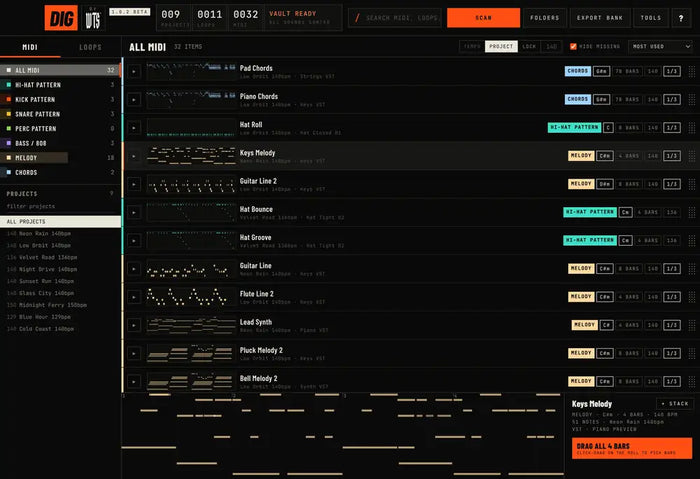
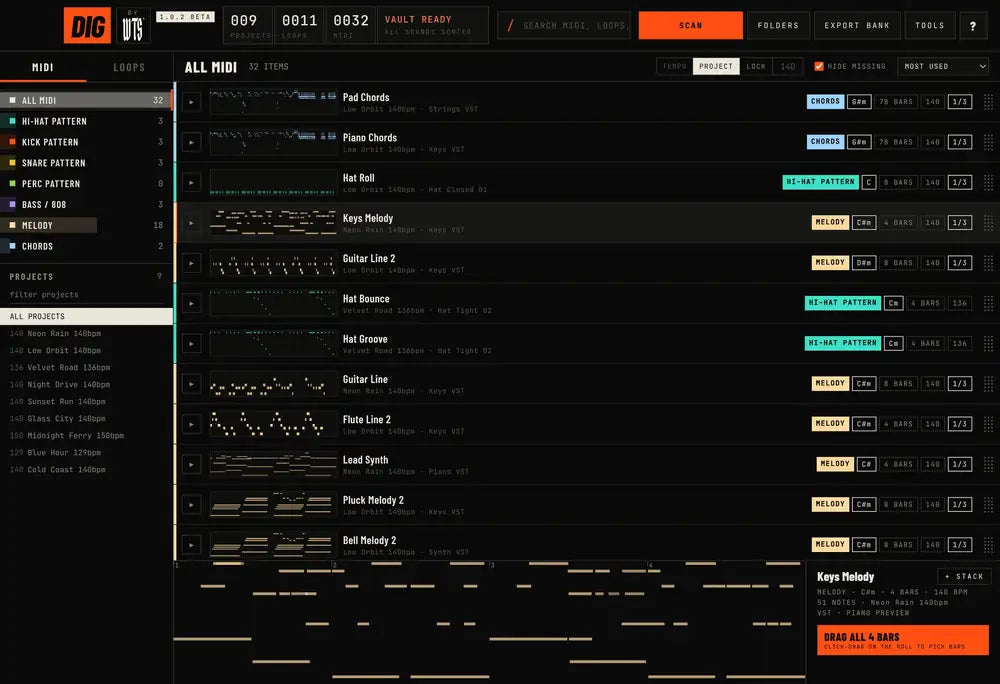
We built DIG because we had the same problem. DIG scans all your FL Studio projects at once and pulls out every pattern into one library, already sorted by type — hi-hats, kicks, snares, percs, 808 & bass, chords and melodies.
You see every pattern with its key, length and BPM, preview it on the piano roll, and drag it straight into FL Studio. Want only 140 BPM hi-hats? Filter. Looking for that melody from one specific project? Search. That 20-minute hunt becomes 5 seconds.
It runs on Mac and Windows and comes with a full PDF manual.
Mix Your Patterns With Fresh Loops
The best workflow? Combine your own patterns with fresh sounds. Take an old 808 pattern and lay it under a loop from Visions or a kit from our construction kits. Need drums? Grab Lunch Box Vol. 1. For more on royalty-free sounds, read The Producer's Guide to Royalty-Free Loop Kits.
Get DIG Before Everyone Else
DIG is the FL Studio tool we built at WeTheSound to fix exactly this. It scans every project you've ever made, pulls out each hi-hat, 808, chord and melody, sorts them, and lets you drag any pattern straight into a new beat — without opening a single old project.
DIG is coming soon. Join the DIG waitlist here to be first in line when it drops, and check out the rest of our producer tools in the Plugins section.